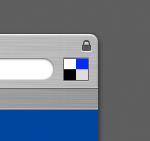
Put a del.icio.us button in Safari

Friday, September 22nd, 2006

Safari

I started using del.icio.us a few months ago to keep bookmarks in sync across several computers at work and home, and it’s been my default home page ever since. Tonight I decided to change the “Home” button in Safari’s toolbar to something a bit more suitable. This might be old hat for some OSX users, but here are the steps you’ll need to take:

  1. Open a Finder window and right-click on Safari.app, choose Show Package Contents.
  2. Open the Contents -> Resources folder.
  3. Find Home.tif, HomePressed.tif and optionally HomeDisabled.tif.
  4. Make a backup copy of these, and edit the originals in an image editor. That’s it!

Remember to backup your work, since it’ll probably be overwritten the next time Safari is updated. I started with the standard del.icio.us logo, but made a few small changes to make it blend in better. You can download the files by clicking here and here.

There are 3 comments in this article:

  1. 5/12/2006m6 said:

    Neat, thanks!
    But did you just link it to del.icio.us homepage? I tried to make it run the “add to del.icio.us” javascript, but Safari won’t allow that. Any clues on how to get it working?

  2. 5/12/2006Marc Charbonneau said:

    It’s just linked to my del.icio.us bookmarks page, which is really all I need anyway. I keep a separate bookmarklet in the Bookmarks menu for posting.

  3. 9/03/2008Doug said:

    I wrote a plug-in for Safari that lets you do some more stuff with del.icio.us directly from Safari. You can check it out here: http://delicioussafari.com